
Continuous AI Mentorships
Understand the four feedback cycles of Lida's Artificial Intelligence and how they transform your routine.
Common productivity apps are limited to storing text and beeping reminders. Lida goes further: it acts as a pocket tactical and strategic mentor.
Our Artificial Intelligence follows your journey in four distinct frequencies, adapting its "temperament" and level of analysis to each moment of your routine.
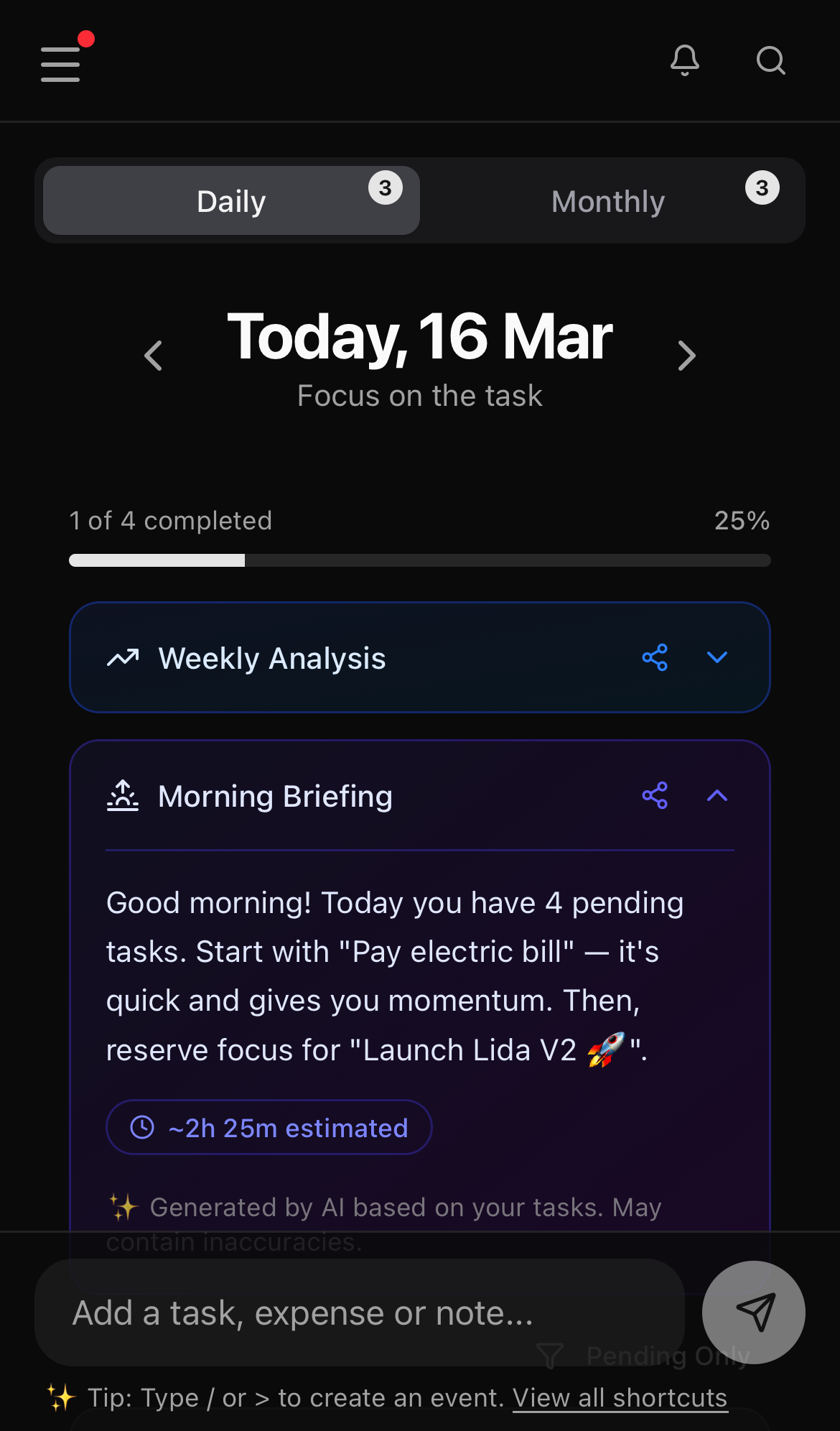
🌅 1. The Morning Briefing (Tactical Focus)
When it happens: Daily, right when you open Lida in the morning on your Daily Log.
In the morning, your brain needs clarity and direction, not overload. Lida's AI analyzes everything scheduled for your day, cross-references it with pending items, and delivers short and direct guidance at the top of your screen.
- The tone: An execution-focused strategist, pointing out where to start to reduce morning anxiety.
When you request the Morning Briefing, generation continues in the background so you can keep using Lida normally. Once it is ready, the content will be available in the Daily Log and, if push notifications are enabled, Lida will notify you.
🌙 2. The Evening Wrap-up (Cognitive Closure)
When it happens: Daily, when clicking "Complete Day" at the end of your Daily Log.
Carrying the guilt of unfinished tasks to bed sabotages your rest and increases mental exhaustion. At the end of the day, Lida introduces the Wrap-up. The AI evaluates your completion volume and what was left behind.
- The tone: A reflective and welcoming stance, helping you process the day, accept what wasn't done, and completely detach from work to have a restorative night's sleep.
📈 3. The Weekly Insight (Trend Analysis)
When it happens: Once a week, consolidating the history of your last 7 days.
The weekly cycle is where your patterns start to become statistics. The AI evaluates your consistency throughout the week and identifies which Trails (tags) received more energy and which were neglected.
Lida's AI doesn't offer generic motivational phrases. It looks at concrete data: which tasks you postponed, which tags consumed the most time, and where your money was spent — delivering a real diagnosis.
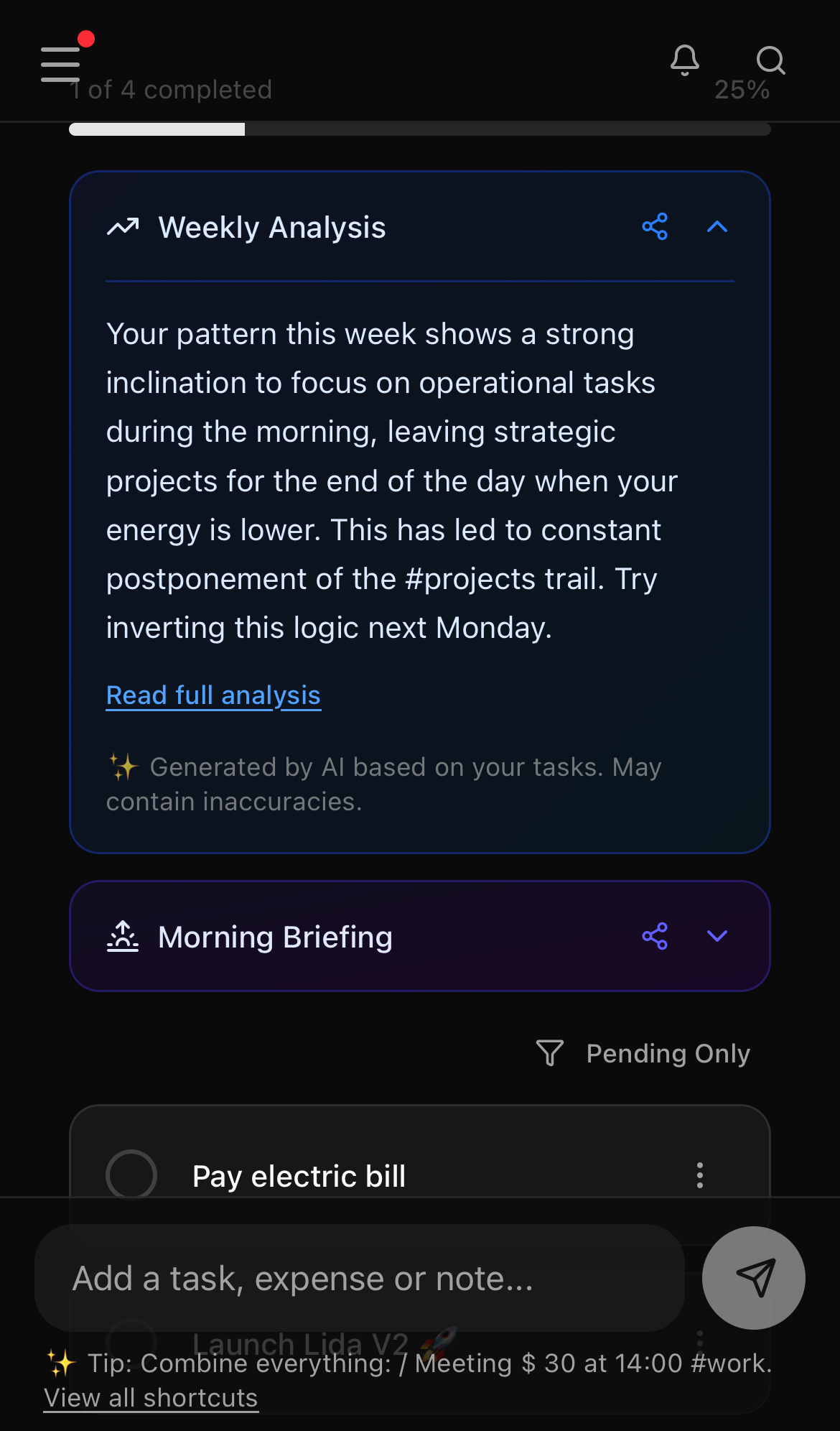
- The tone: A process performance consultant. It shows you the raw reality: whether you spent the entire week putting out fires in a single trail or if you managed to maintain a healthy balance.
🗺️ 4. The Monthly Insight (Strategic Alignment)
When it happens: In your Monthly Log, evaluating macro progress.
This is Lida's deepest mentoring cycle, acting as the board of directors of your own life to ensure that your daily routine is aligned with your long-term goals.
Optional monthly goal
Wrap-up, Weekly, and Monthly analyses are generated in the background. You can keep using Lida and, if push notifications are enabled, you will be notified when each analysis is ready.
- The tone: The Strategic Advisor. If you defined that your intention for the month was "Focus on health and spend time with family", but your financial and task history shows 90% of the time spent on the
#worktrail, the AI will alert you with surgical precision: "Your Monthly Map says one thing, but your Daily Trench is executing another. Shall we recalibrate?"
✍️ Reflection in the Day Wrap-Up
When you end your day, the End-of-Day Wrap-Up starts with a question: "Would you like to add a final reflection about your day?". Write a few lines if you want — or leave it blank. When you're ready, click Finish Day and Generate Advice. The dialog closes and the Evening Wrap-up opens with Generating... until the advice is ready.
If you write a reflection, it is woven into the context sent to the AI, making the summary more personal. If you leave it blank, a neutral placeholder is used instead. This keeps the AI as an organizing co-pilot — it helps you close the day with clarity without replacing your own voice.
⚡ AI Suggested Actions
In addition to analyses, the AI may offer concrete suggested actions: create a reminder, adjust a date, remove a duplicate item, or break a large task into smaller parts. These suggestions are always optional.
Each suggestion appears as a proposal you can review before deciding:
- Accept: applies the change to your log.
- Ignore: dismisses the suggestion without any changes.
You are in control
- Create: the AI may suggest a new pre-filled item, but it is only added to your day or month when you accept it.
- Edit: the AI may propose adjusting an existing item's date, time, amount, or tag. The original item does not change until you confirm.
- Delete: the AI may flag an item as duplicate or outdated. Deletion only happens after your confirmation.
- Chunk: when a task seems too large, the AI may suggest splitting it into smaller steps. These steps are only created if you accept.
Your response state (Accept or Ignore) is persistent, so the same suggestion does not reappear once you have decided. This keeps the AI as a co-pilot: it points out paths, but you set the destination.